Everything a family day needs.
Here is what Rondino can do today, for families with school children and for families who learn at home. At the top, the areas at a glance; below, each area with pictures and details to expand.
Day app for parents
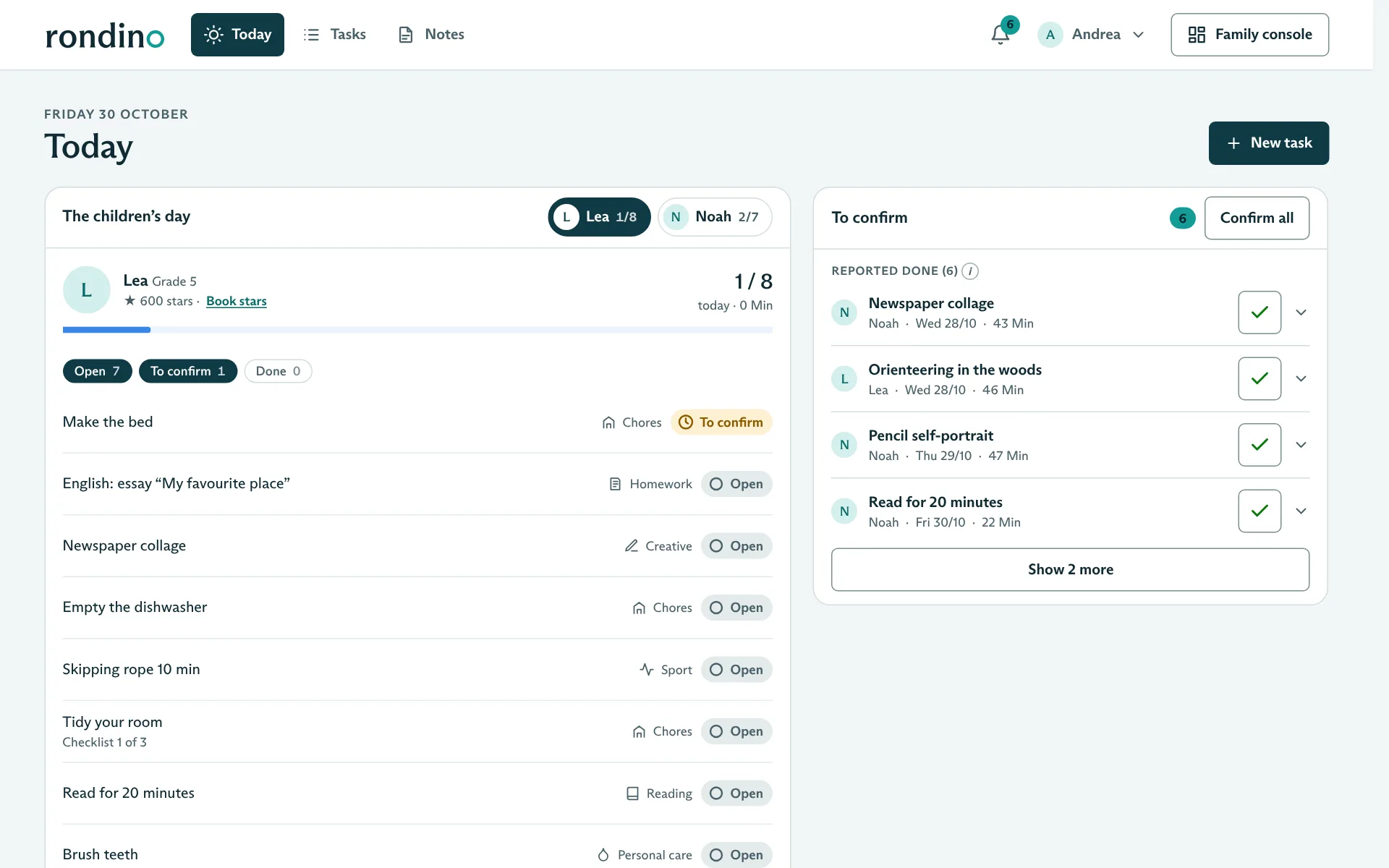
Today, Tasks and Notes: every child’s day and what is waiting for you.
- Today: each child’s day, to confirm, reward requests, open homework
- Each child’s day with all tasks
- Confirm with feedback, one at a time or all at once
Confirm with feedback
You confirm reported tasks with duration, title, subject and stars. There are also two short fields: “That was good” and “Next time”. The child sees the feedback with the task.
Take another look
Instead of confirming, you can hand a task back. The child reworks it and, if you like, gets a bonus for it. Reworking is rewarded, not punished.
Surprise stars
Self-chosen reading or creative work has no fixed stars. You can give surprise stars when confirming.
Suggestions to release
For homeschooling: a notice shows how many suggestions are ready for this week and next. One click takes you there.
Open homework
For school children, “Today” lists the homework and tests for the next 14 days.
Family console
Plan, review, reward and manage the family, protected by the parent PIN.
- Four groups: Plan, Review, Reward, Family and account
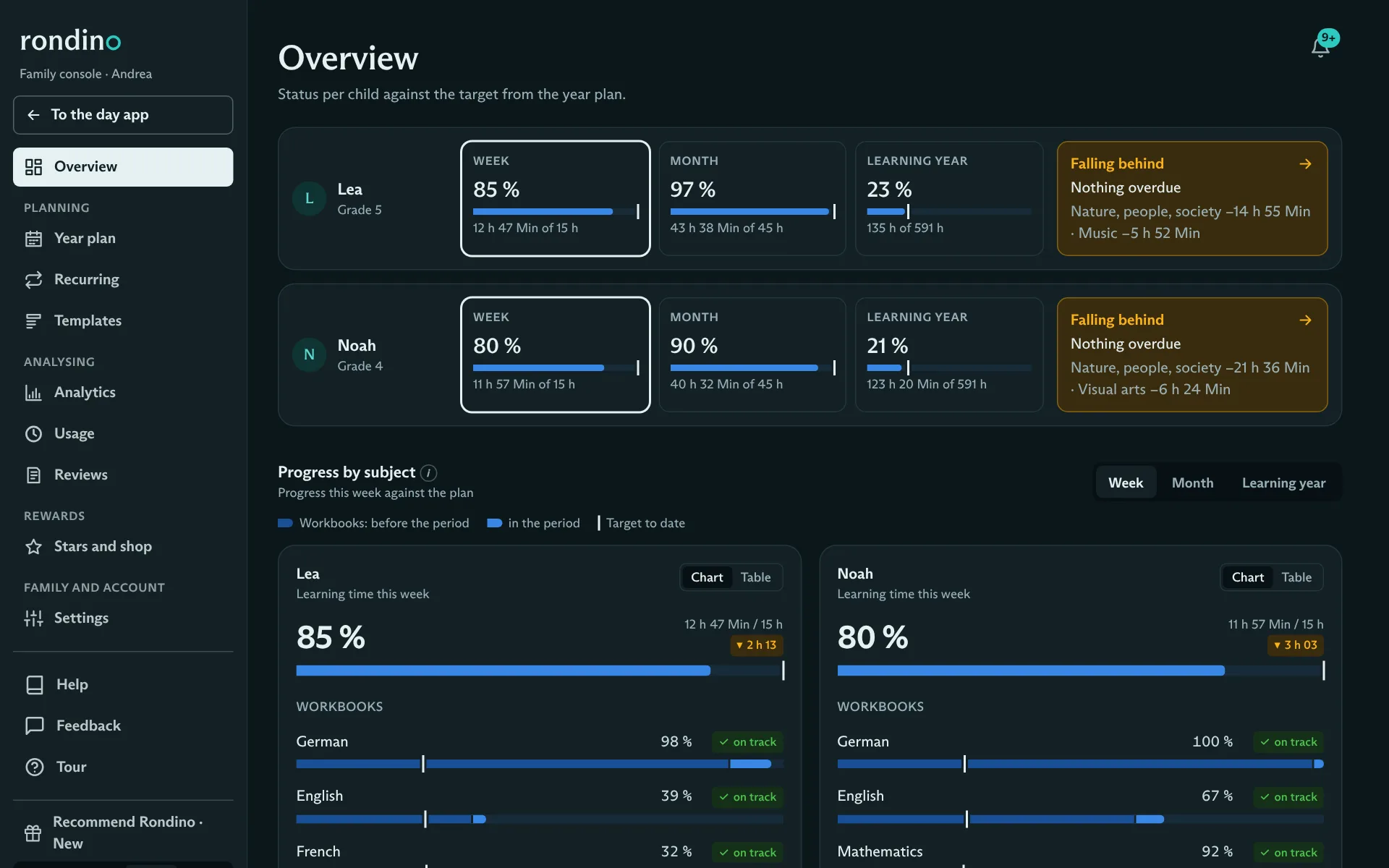
- Status per child against the annual plan
- Top right, you switch between the day app and the family console
Parent PIN
The family console opens with a parent PIN (4 to 6 digits) that the children don’t know. It then stays open for 15 minutes. Going back to the day app needs no PIN.
Status per child
The console’s start page shows for each child how much learning time has added up this week, this month and in the learning year, measured against the target from the annual plan. Anyone falling behind is marked.
On the computer
The annual plan, reports and usage need room for tables and charts, so they open on the computer. Everything else stays available on the phone.
Chores, tasks and templates
Chores and routines that distribute themselves every week, and all other tasks.
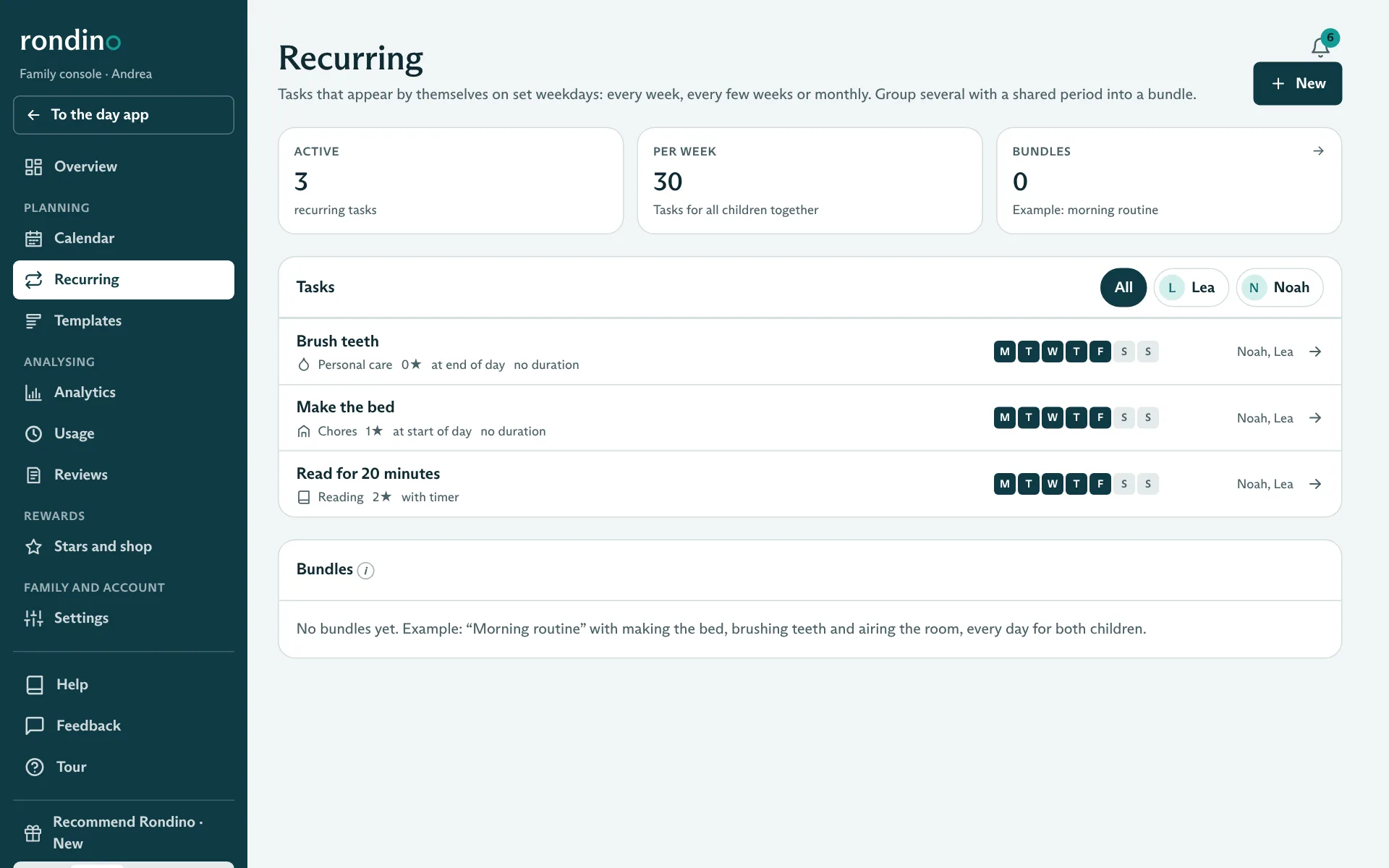
- Chores as recurring tasks by weekday, for one or more children
- Day, week and month views with filters by child and status
- Weekly plan per child as an A4 sheet to print
Distributing chores
Each chore is entered once as a recurring task: for which children, on which weekdays, for how many stars. From then on it appears on every matching day for the right children, without you having to think about it.
Routines
Categories such as Chores and Personal care are routines: they stay on the planned day and children cannot move them.
All kinds of tasks
Learning, Reading, Creative, Sport, Chores and Personal care are ready to use. Your own categories are possible (up to 12 active), each with an icon, default stars and whether the time counts.
For one or more children
A task can be created for several children at once. Each child does and reports it on their own.
Subject, curriculum, pages
Learning tasks get a Lehrplan 21 subject and, if you like, a textbook and the pages from–to. From this Rondino calculates progress in the book.
Proof
Adjustable per task: log the duration, ask for a photo, short description. A photo that doesn’t fit can be deleted again.
Timer with focus view
While working, tasks with a timer show the child only the current task, with “Done” and “Pause”. The measured time is suggested when reporting. The timer does not give stars.
Place in the day
If you like, recurring tasks stay fixed at the start of the day (e.g. “Make the bed”) or at the end (e.g. “Brush teeth”). The other tasks can be arranged freely.
Bundles
Groups of tasks that appear automatically over a period of time, such as a training plan or a project week.
Choice tasks
You offer two or three options and the child picks one. The chosen one becomes a normal task.
Editing series
When you delete a recurring task, Rondino asks whether you mean just this day or the whole series.
Printing the weekly plan
Exactly one landscape A4 sheet per child, Monday to Friday or including the weekend, with boxes to tick by hand and space for notes.
Kids’ app
Calm, clear and without distractions. For children from about eight.
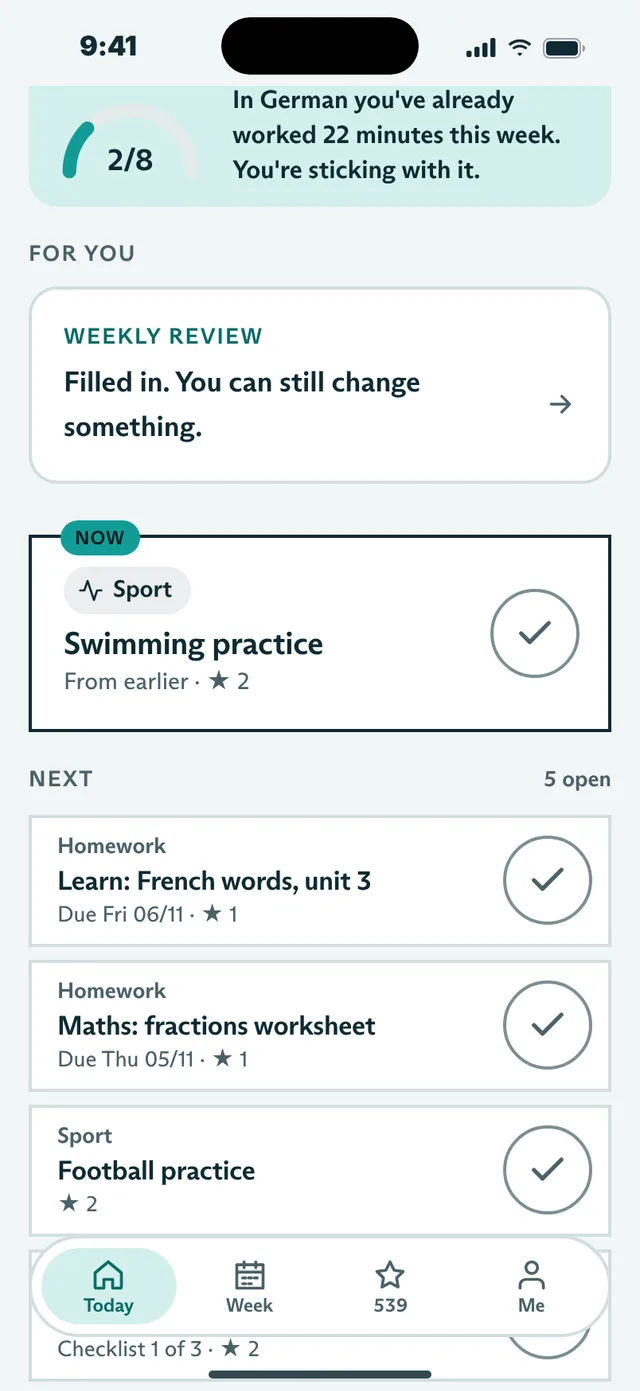
- Today: the day’s sun, “Up next”, task cards
- Week: week stamps and progress in every book
- Four tabs at the bottom: Today, Week, Stars and Me
Today
The day’s sun shows how much is done. Only one task at a time is “Up next”. Completed tasks stay visible and can be undone.
Reporting
Tick off with duration, photo and short description, depending on what the task asks for. Afterwards, if you like, the question “How was it?”: easy, just right or hard.
Week
A week stamp for every day completed, the rest of the week, and “How far you are”: progress in each book as a growing path instead of a percentage.
Add
Enter voluntary work yourself, with a photo. For school kids also homework and tests with a due date; Rondino suggests study sessions before the test.
For you
At the top of “Today” the child sees notes from the parents and small hints that matter right now. If there is nothing, the space stays empty.
Me
Weekly review, showcase, own notepad and the app’s look are gathered under “Me”.
Review
Every Friday from 4 pm, the weekly review. It becomes the learning portfolio in the report.
Showcase
Their own work with photos that Mum or Dad have looked at, plus surprise milestones.
Made for children
Large tap targets (56 px), nothing below 14 px, sentences that are easy to read aloud. Persistence is praised, never speed. No grades, no leaderboard, no comparisons between siblings, no penalties for missed days.
Homework and tests
For school kids: enter, plan, tick off, without constant reminders.
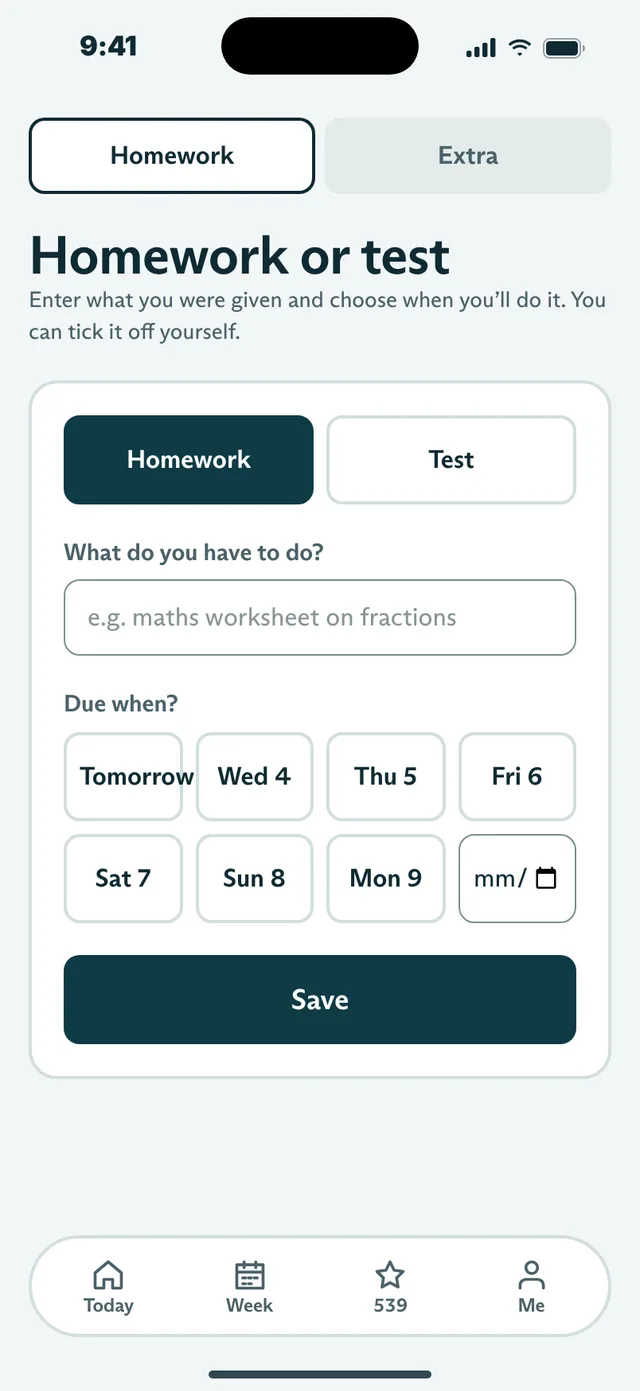
- Children enter homework themselves, with a due date
- Tests with study sessions in the days before
- Parents see open homework for the next 14 days
Entering
Under “Add”, the child picks “Homework” or “Test”, writes briefly what to do and taps the due date.
Planning
The due date is separate from the day the task is done. That way homework can be moved to a quieter afternoon.
Tests
For a test, Rondino suggests up to three study sessions in the days before. The test itself appears in the plan on the day of the test.
Tick off without confirming
The child ticks off homework themselves, without you having to confirm. If it is done before the due date, there is a star (adjustable).
School kids only
The Homework category is active in “School kids” mode. Families who learn at home plan learning through the year plan and learning tasks.
Stars and rewards
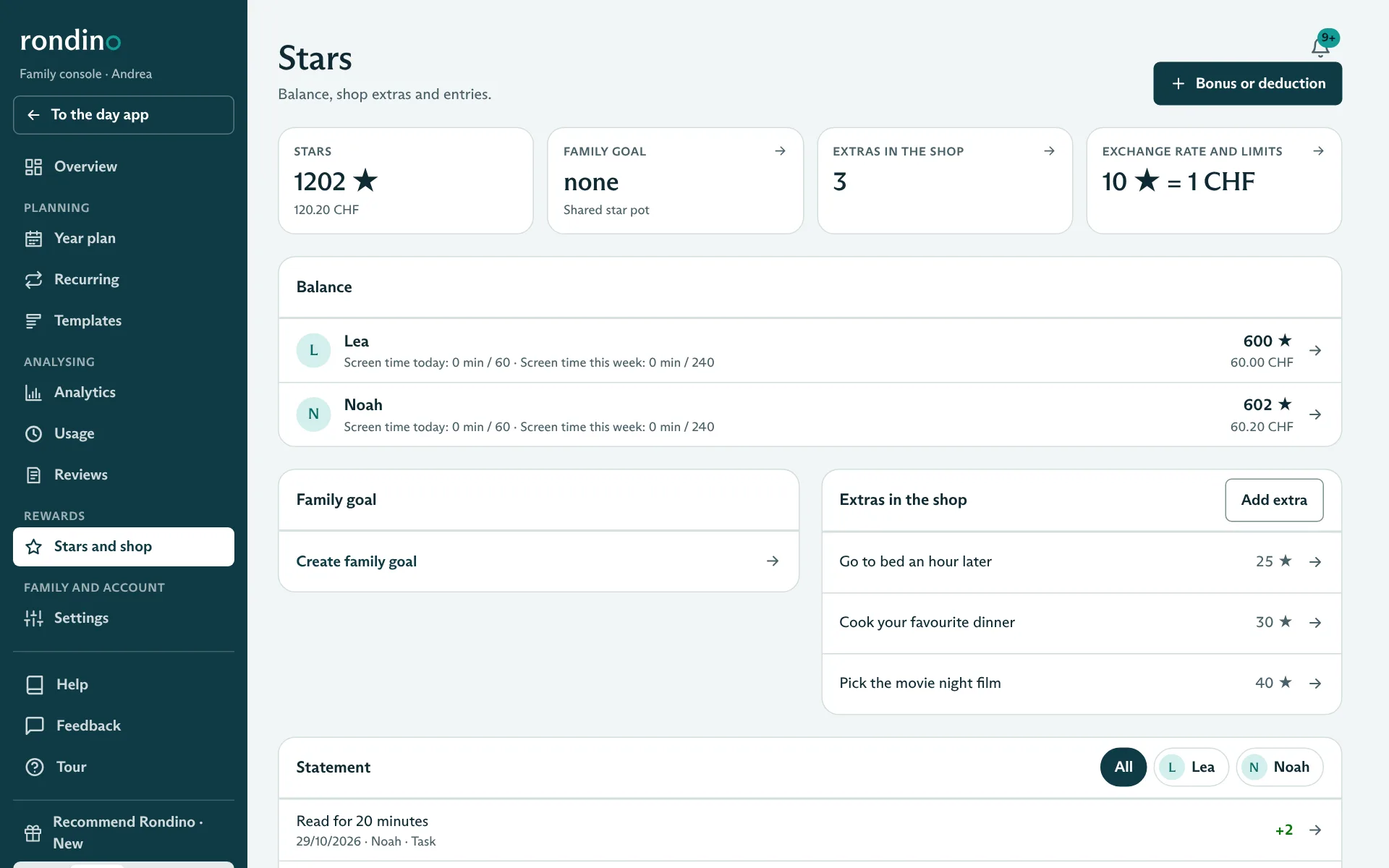
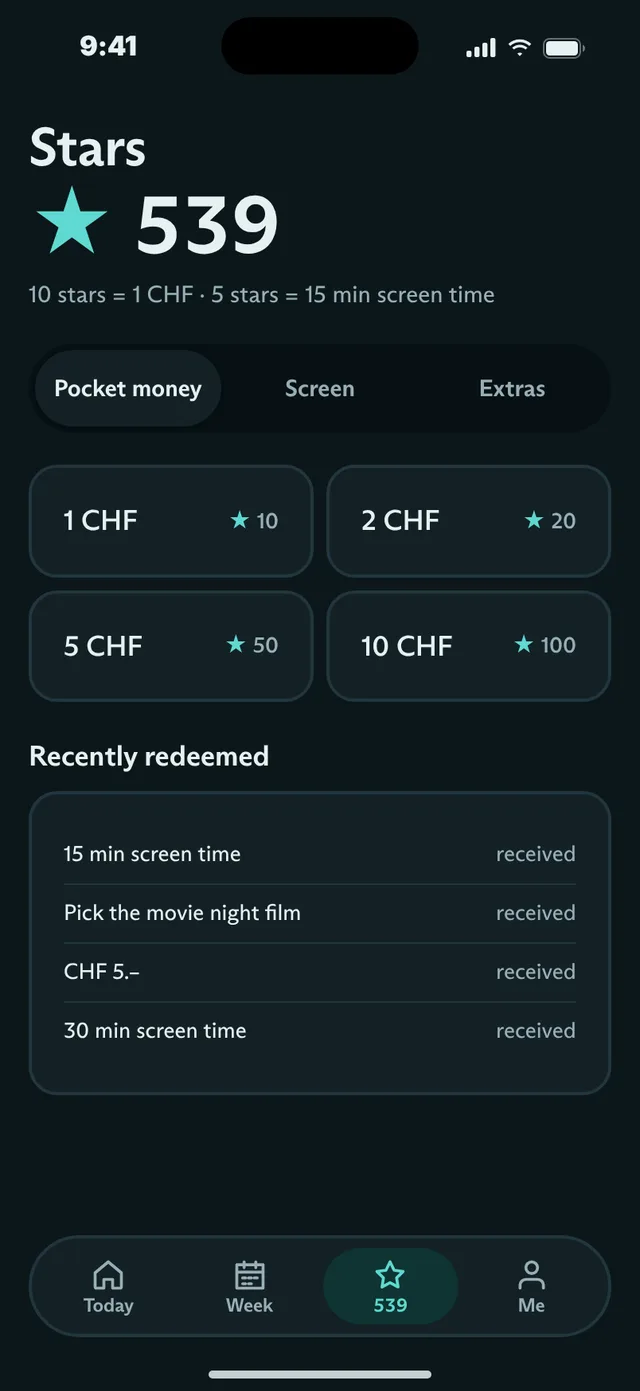
Stars for pocket money, screen time or extras, with limits you set.
- Freely adjustable exchange rate for francs and screen time
- Screen time with daily and weekly limits that reset themselves
- Shared star jar for a family goal
Shop for children
Pocket money in fixed amounts, screen time in blocks, and your own extras such as “Stay up an hour later”. Requests show up for the parents.
Balance and history
Per child, all stars earned and redeemed, with reason and date.
Daily cap
If you like, an upper limit on stars per day, so that it is about quality, not quantity. Off by default.
Family goal
A shared jar: children put in 1, 5 or 10 stars, and only the total is visible. Once the goal is reached, you do something together. If it is cancelled, the stars go back.
What is left out on purpose
No stars for speed, no streaks that are lost when a day is missed, no leaderboards.
Notepad and notifications
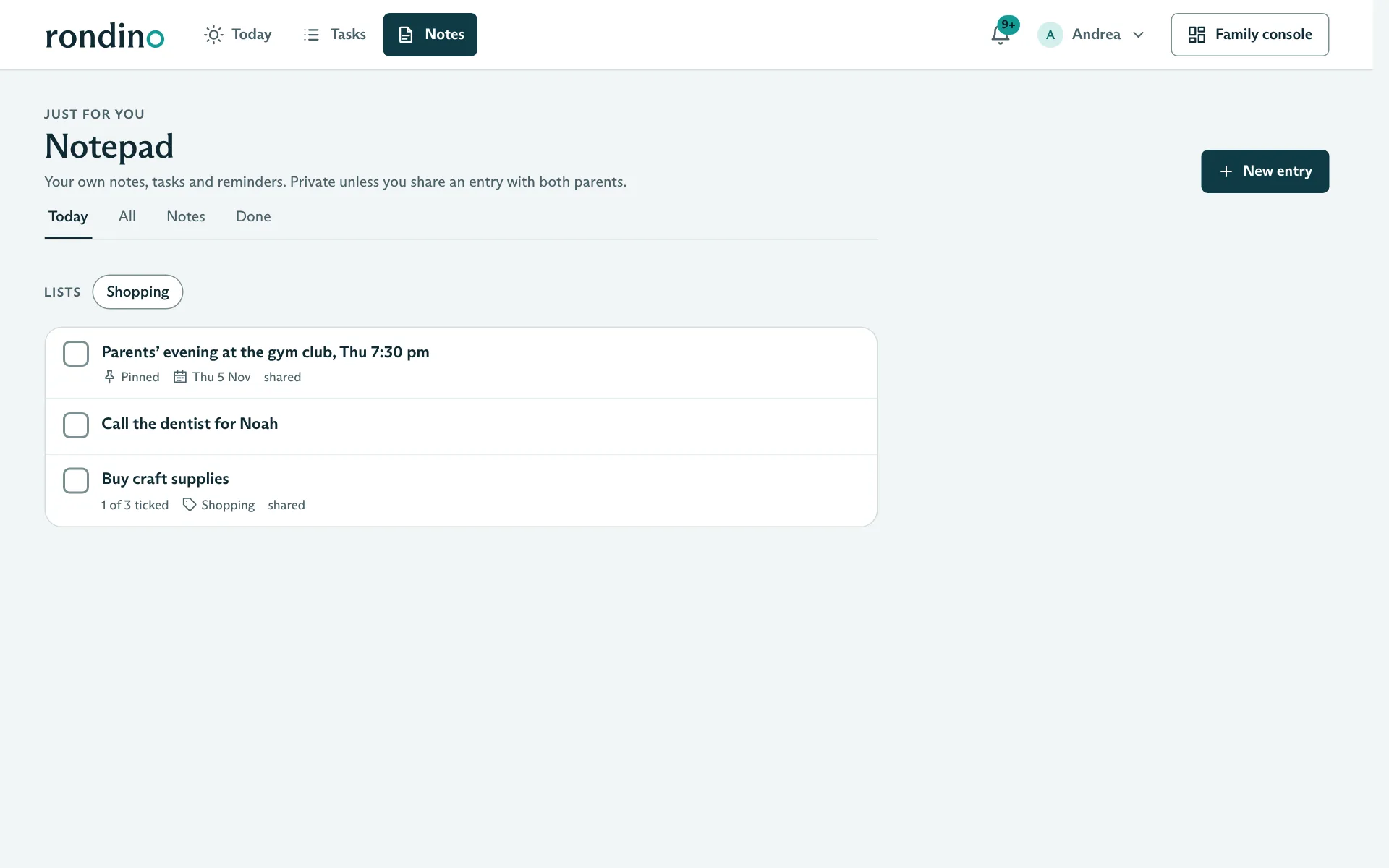
Personal notes and reminders, clearly separate from learning.
- Notes, to-dos, checklists and lists
- Private or shared with the other parent
- Push notifications on phone and computer
Entries
A note or a to-do, with an optional date, reminder, repetition (daily, weekdays, weekly, monthly), list and checklist. Important things can be pinned.
Who sees what
Entries are private. If you want, you share an entry with both parents. Children have their own notepad; parents only see what a child shares.
Notifications
Reminders, a morning brief and hints about learning as push notifications. With quiet hours (by default 8:30 pm to 7:00 am) and the choice of whether the content appears on the lock screen. On iPhone from iOS 16.4, once Rondino has been added to the home screen.
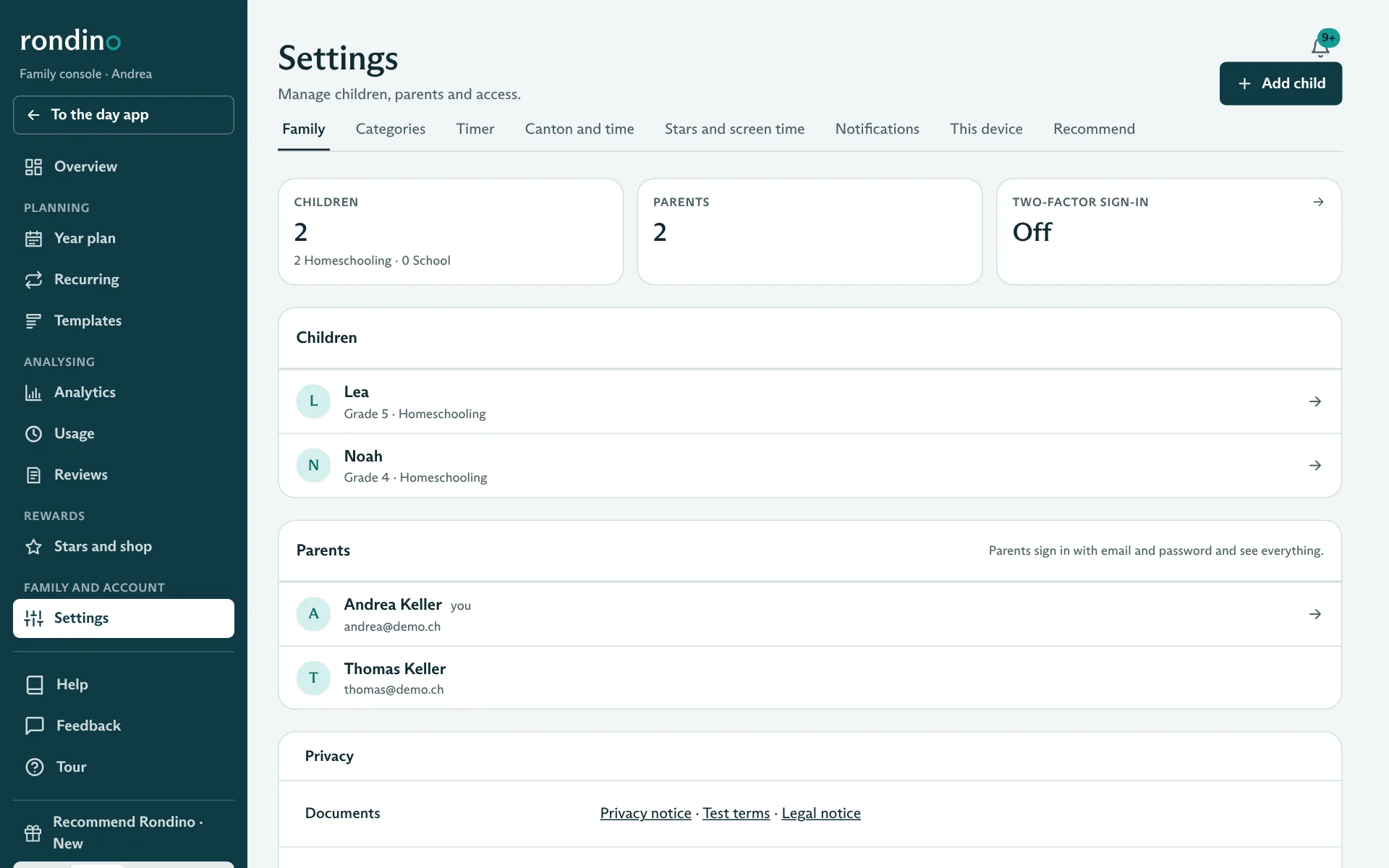
Family, devices and languages
Two parents, as many devices as you like, all languages, three colour themes.
- Children log in with a PIN, on their own phone or a family device
- German, French, Italian and English, per device
- Colour themes “Morgen”, “Abend” and “Wald”
Roles
Parents manage everything. Children only see their own day, their photos and entries.
Devices
Rondino runs in the browser on phone, tablet and computer and can be added to the home screen like an app. On a shared device you switch profile and enter the PIN.
Usage mode
Homeschooling or school kids. Nothing is lost when switching; the year plan and report are just hidden.
Colour themes
“Morgen” (light), “Abend” (dark) and “Wald” (calm, low-stimulus, e.g. for long study sessions). Without a choice, Rondino follows the device setting.
Tour and help
A tour explains every page, and small ⓘ symbols explain individual fields. “First steps” guides new families through the setup.
Accessibility
Contrast to WCAG 2.2 AA in all three colour themes, colour never carries meaning on its own, every chart also as a table.
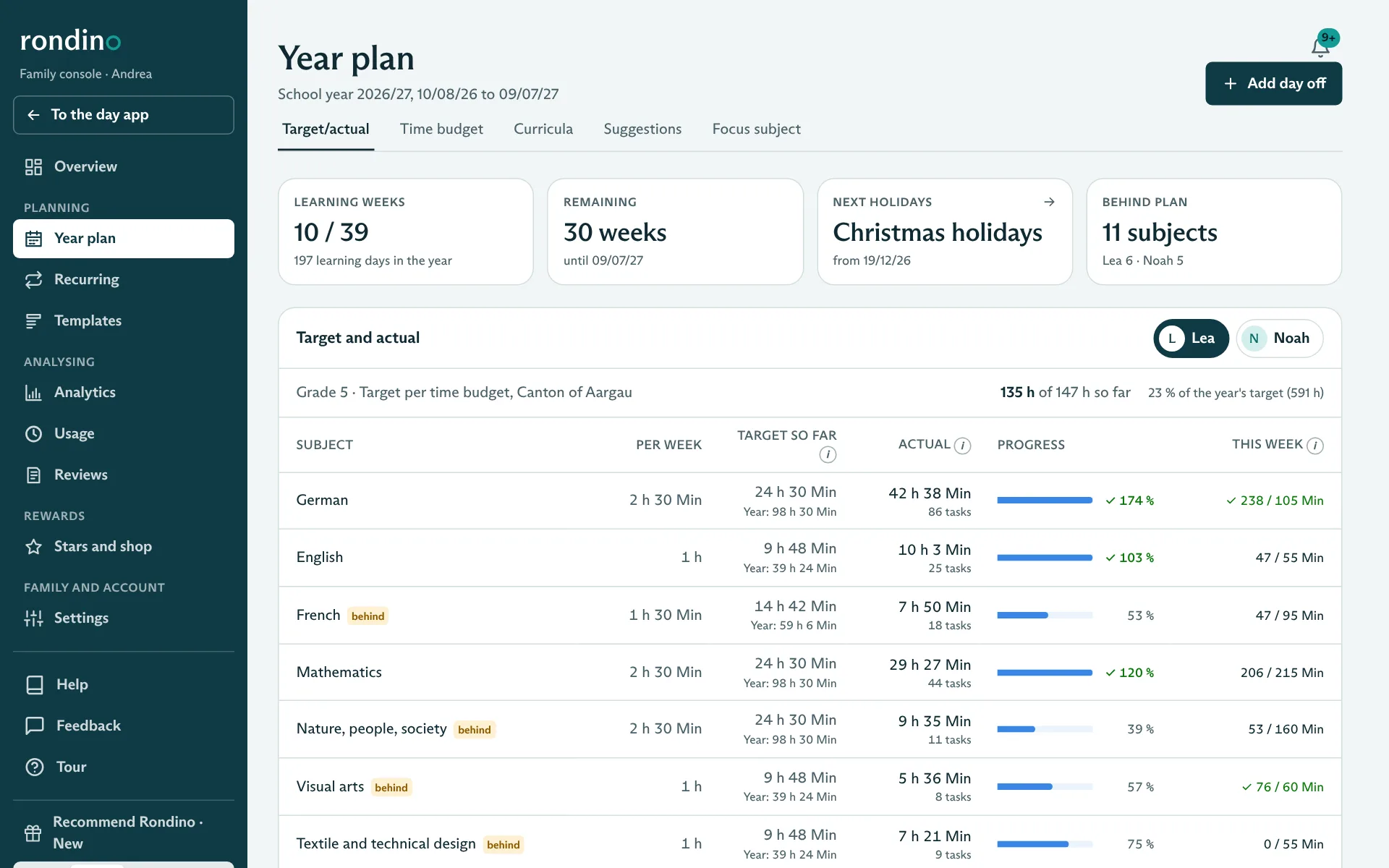
For homeschooling: year plan and Lehrplan 21
Learning year, holidays, time budget by canton, curricula and weekly suggestions.
- Target and actual per subject across the whole learning year
- Time budget by canton: Aargau, Zurich, Bern and a basic model
- Curricula with page count and target date; Rondino spreads out the pages
Learning weeks and holidays
Learning year with start and end, holidays (suggested for the canton, adjustable) and spontaneous days off. The target only counts real learning weeks.
Time budget
Your canton’s minimum time, distributed according to the weighting of the timetable. In Aargau under § 119 V VSG. Your own targets per child and subject are possible.
Cantonal models
Obligations, notes and sources are stored for Aargau, Zurich and Bern, with a basic model for the other cantons. The information carries a review date, and Rondino flags outdated rules.
Curricula and page plan
Books with page count and target date. Rondino spreads the remaining pages over the remaining learning days and shows each child’s progress.
Weekly suggestions
Subjects with books by remaining pages, the others by time budget. Children only see what you release: one by one or the whole week.
Focus subject
Put one subject at the centre for a while, for example maths with “Fractions”. It then comes up every day and appears in the learning report.
Carry-over
If you start with Rondino in the middle of the learning year, you add the learning time so far as a lump sum. The target stays correct.
Moving learning tasks
Children may move learning tasks to another day themselves. Routines such as chores stay fixed.
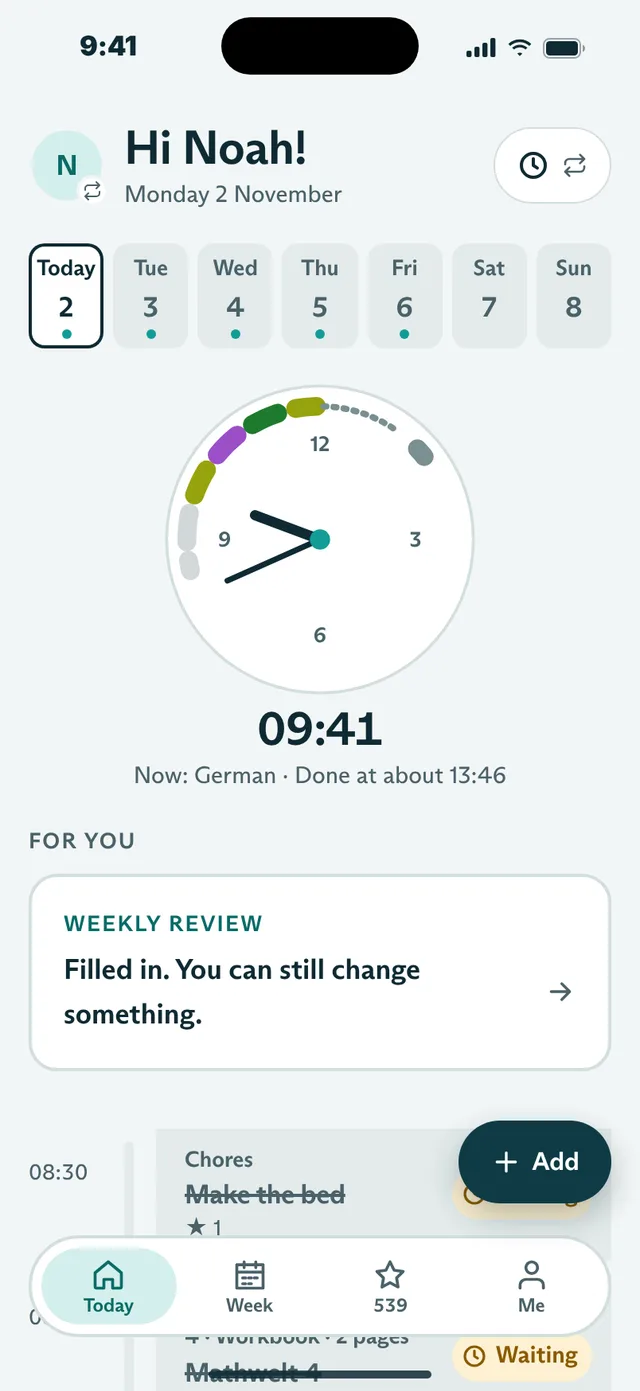
For homeschooling: timetable
Set times for subjects, for children who need more structure.
- Subjects follow one another from a start time, with breaks and a fixed lunch
- Turn on per child and week, switch off single days
- In the children’s app, a timeline with a clearly visible clock
How Rondino works it out
Each subject gets its planned time, with a short break in between (10 minutes by default). If a child is quicker, everything moves forward; if they need longer, everything moves back. With the timer, the measured time counts.
Lunch stays fixed
Lunch is always at the same time. Whatever isn’t finished before carries on afterwards.
Three views
The child chooses how their day looks: a line with a digital clock, a clock face with a coloured ring of subjects, or a day arc. One tap at the top switches the view.
Without pressure
The timetable only shows where the day stands. There’s no countdown, no red times, no stars for keeping to it and no deduction for running over.
Turning it on and off
You turn it on per child for this week or next, also right while planning. For a single day you can switch it off again on “Today”.
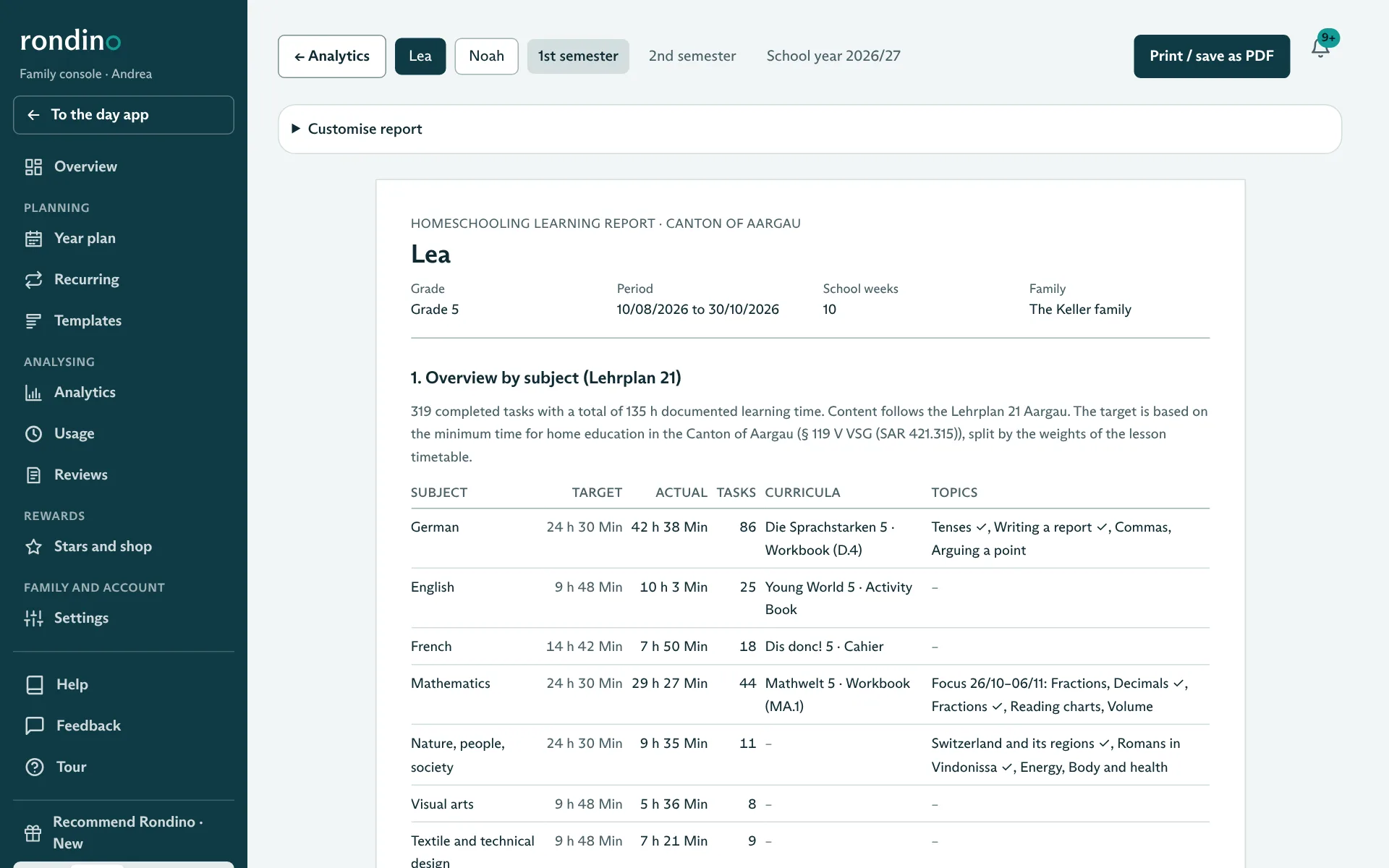
For homeschooling: learning report and portfolio
The proof for the canton, straight from the logged tasks.
- Per child and semester, ready to print as PDF
- Overview by subject with curricula, topics and learning time
- Learning portfolio from the children’s weekly reviews
Overview by subject
Per subject: target, actual, number of tasks, curricula used and topics. The overview is always included.
Documented work
Selected work with photos, by subject or category on separate pages. Photos are scaled down for the PDF so that the file stays manageable.
Customise report
You choose what goes in: photos, text only, books, other activities, portfolio, individual subjects or categories.
Learning portfolio
Every Friday from 4 pm, the children fill in a short review: how was the week, what did I learn, what will I do next. The questions follow the fact sheet “Private Schulung – Lernportfolio” of the canton of Aargau. Parents can comment.
Milestones
Milestones reached, such as “Book finished” or “Reworked 10 times”, appear in the report. They do not give stars.
Analytics and usage
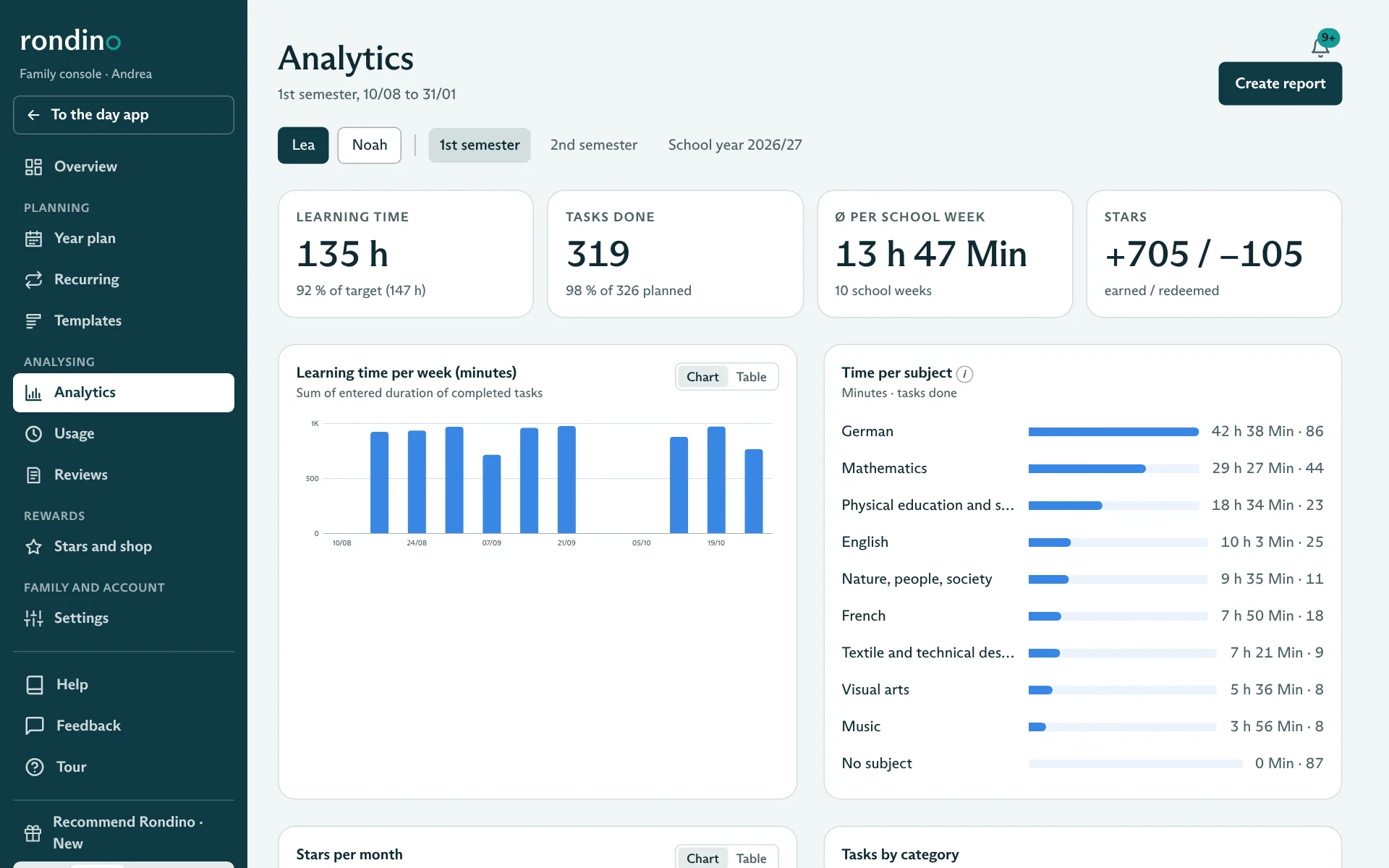
Learning time, tasks and stars over time, and how the children use Rondino.
- Per child, per semester or learning year
- Every chart also as a table
- Usage: time in the app, devices, PIN logins
Analytics
Learning time per week, time per subject, tasks completed, average per learning week, stars earned and redeemed, categories.
Reviews
All of a child’s weekly reviews with the parents’ comments and the milestones reached.
Usage
When, for how long and on which device a child had Rondino open, and when they logged in with their PIN. Only Rondino itself, no other apps, no location. Deleted after 90 days, can be switched off.
Security
Data in Zurich, encrypted, two-factor login for parents, every family on its own.
- Database and photos in Zurich, encrypted on disk
- Two-factor login for all parents, lockout after failed attempts
- Family can be fully deleted at any time
All answers about storage location, encryption, access, backups and development are in the frequently asked questions under “Security and privacy”.